See how your tables connect. Then query them.
Junction is a desktop database client. Pick two tables and it shows every join route between them. Pick a route and it becomes a query you can edit as a graph or as SQL. Works offline with PostgreSQL, MySQL, SQLite, SQL Server and MongoDB.
Coming soon — Junction is in pre-release. Try Pro free for 14 days, no credit card.
Try it: change the two tables. This is what Junction does with your own database.
Inside the app
Screens from Junction itself, on the example database that comes with it. Click a screenshot to see it full size.
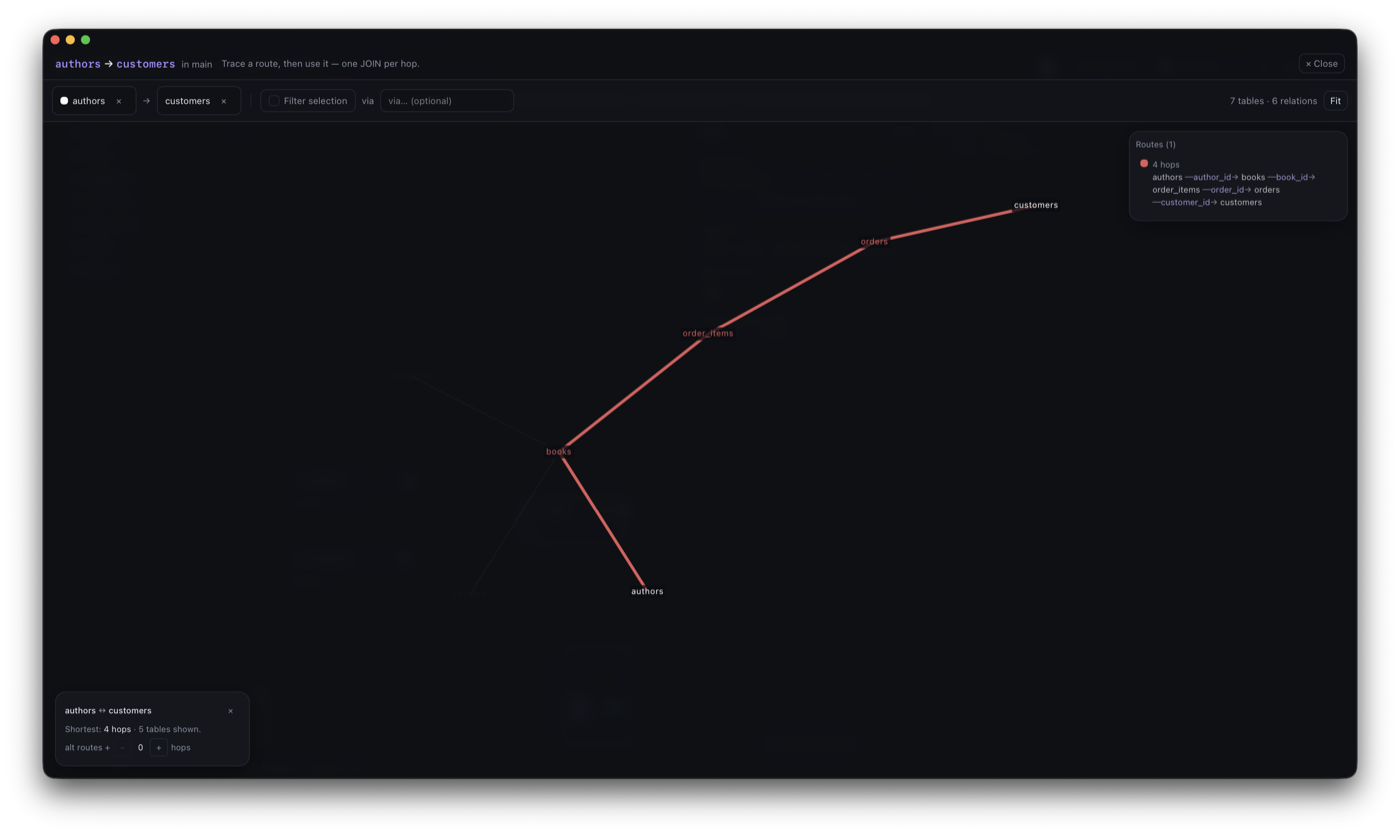
Every route between two tables
Pick a start and an end table. Here it's authors to customers in the example database: 4 hops, through books, order items and orders. Each route gets its own colour, and one click turns it into a query.
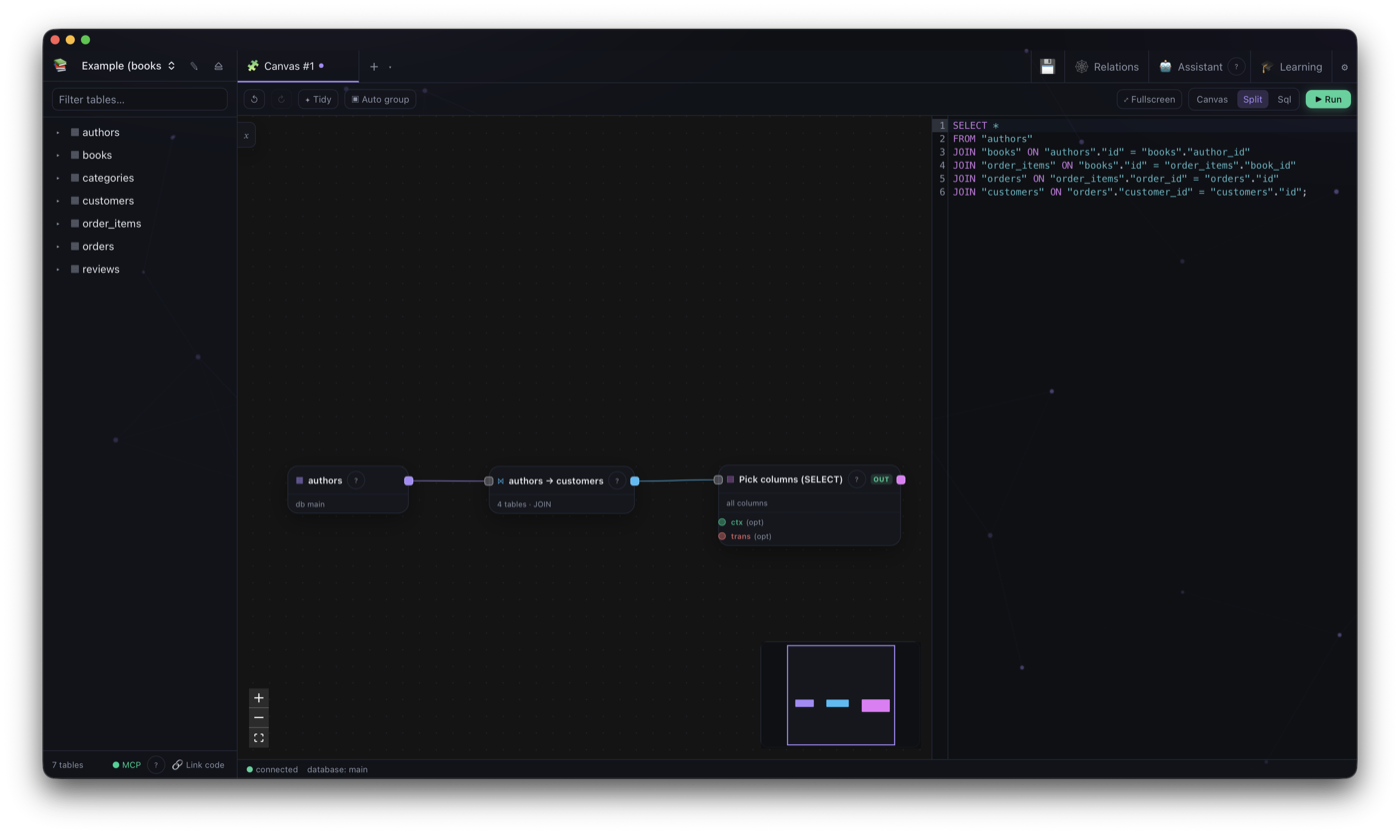
From route to query
The route becomes a single node on the canvas, and the SQL on the right is written for you, one JOIN per hop. Change the graph or the SQL and the other side follows.
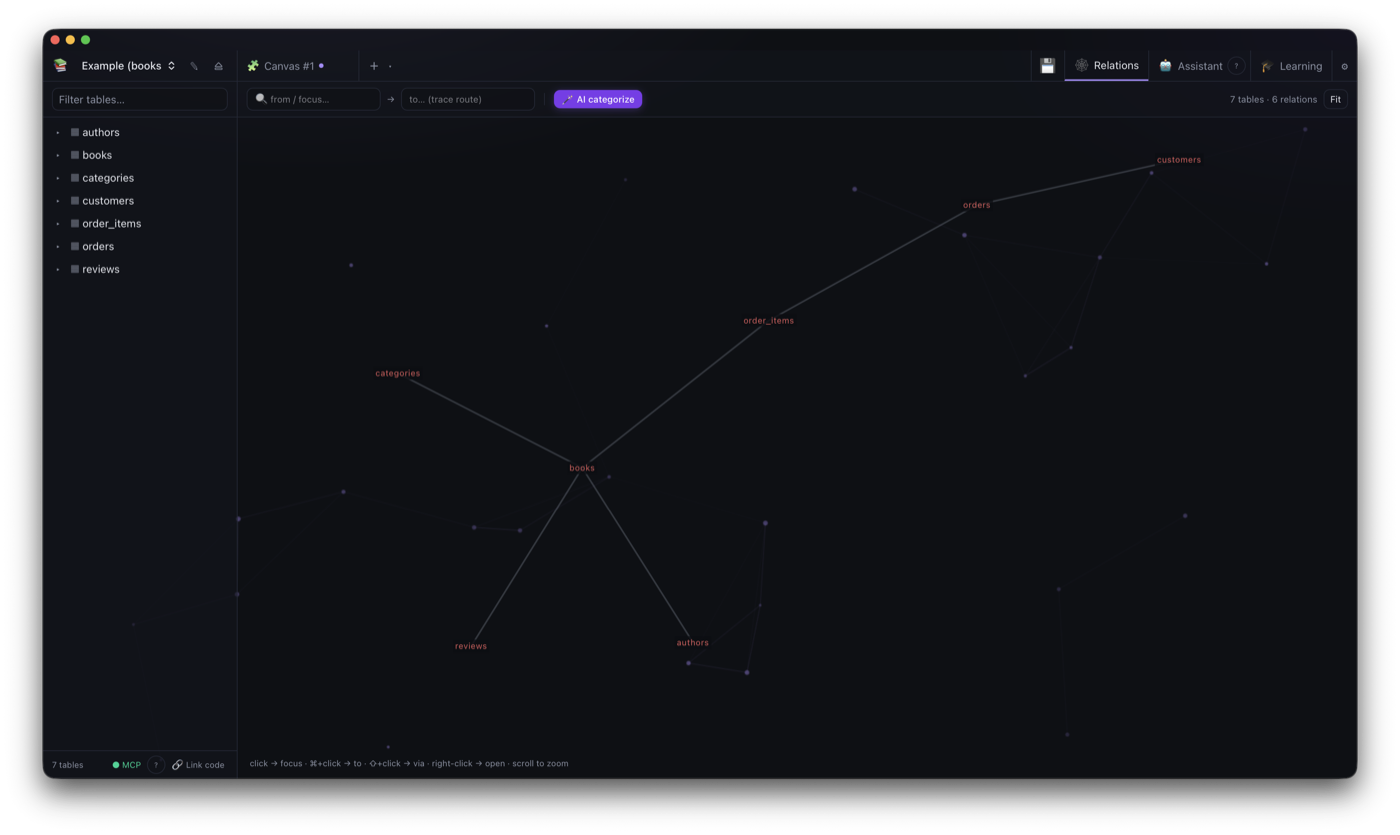
The whole schema on one screen
Every table and key on one map. Focus a table and its neighbours light up by distance while the rest fades. If the database has no foreign keys, Junction can still guess the groups.
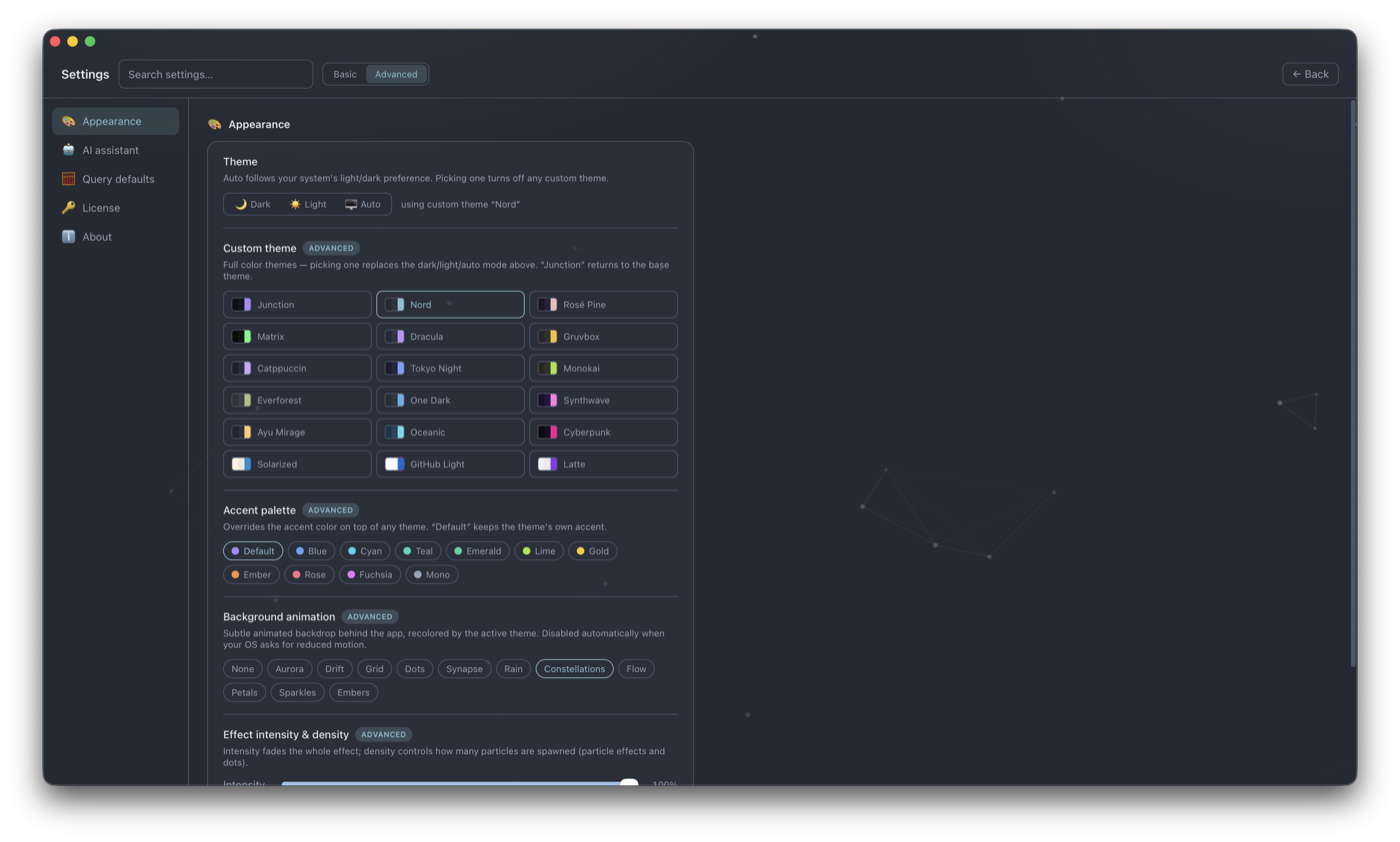
17 themes
Dark, light or whatever your system uses, plus full themes like Nord, Dracula, Gruvbox, Tokyo Night and Catppuccin. I spend all day in it too, so it had to look right.
What else is in it
The parts that don't fit in a screenshot.
Blueprint canvas
Build a query as a graph of scans, joins, filters, aggregates and even writes. The SQL updates as you go, and editing the SQL updates the graph.
Routes between two tables
Pick a start and an end table, optionally a table it has to pass through. Junction lists every path, shortest first, and turns the one you pick into a blueprint.
Relations from your code
No foreign keys in the database? Point Junction at your Laravel or LoopBack project and it reads the relations from the models. It never writes to your files.
An assistant on your own model
Connect any OpenAI-compatible endpoint. LM Studio and Ollama run fully offline. It reads the schema, drafts queries, and asks before it writes anything.
Big imports and exports
.sql dumps of several gigabytes are streamed in and out with real progress. Per-table CSV and JSON export.
Procedures and functions
A separate editor for stored routines. Write the full CREATE statement, dry-run it on mock data, then deploy it.
Stays on your machine
The database drivers are built in (Rust, no ODBC), so localhost really is your laptop. Passwords are encrypted on disk with a key in your OS keychain.
Read-only when you want it
Lock any connection to read-only, so you can look around production without worrying about a stray UPDATE.
Five databases
The same tools work on all of them, relations map included.
Need Oracle, DuckDB, ClickHouse or Cassandra? Tell me which one. The requests decide what I build next.
Using it with a team
Most of what a new developer asks in their first weeks is how the tables fit together. Junction answers a lot of that on its own.
A map new people can explore
The relations map shows how tables connect, so a junior can find the join routes without asking a senior every time.
Relations that only live in code
Relations defined in Laravel or LoopBack models get drawn too, so the model everyone carries in their head ends up on screen.
Safe on real data
Read-only connections, and an assistant that asks before every write, make it reasonable to let new people look at production.
Easy to approve
No telemetry. The Free tier needs no account. For the Pro trial or a paid licence you make an account on tuntau.com to get your key, but the app itself never asks you to sign in. Its only network call is a monthly licence check. Per-seat pricing, monthly, yearly or pay once. See pricing
The full list
Everything Junction does today, in one place.
Show all 46 features
Explore
- From→To route tracing with "via" filter
- Force-directed relations graph
- All join routes drawn at once, colour-coded
- Depth-coloured neighbourhood focus
- AI schema categorization
- Codebase-inferred relations (LoopBack, Laravel…)
- AI relation detection for FK-less schemas
Query
- Blueprint canvas — node-graph query editor
- Integrated SQL with autocomplete, canvas ⇄ SQL both ways
- Multi-statement scripts, a result tab per statement
- Write nodes — INSERT, CREATE, DROP from the canvas
- Visual query builder for quick selects
- Build a blueprint from any route
- Cross-database queries
- Saved queries & query history
- EXPLAIN & cancel running queries
Routines
- Stored procedure & function editor
- Dry-run routines against mock data
Work with data
- Browse, filter, sort & paginate
- Inline edit, insert & delete
- Structured or raw filters
- Import SQL files (streamed, any size)
- SQL dump & restore with progress
- Per-table CSV / JSON export
- Delete database (right-click, guarded)
Engines
- PostgreSQL
- MySQL / MariaDB
- SQLite
- SQL Server
- MongoDB
- Native Rust drivers, no ODBC
AI assistant
- Bring your own model (OpenAI-compatible)
- LM Studio & Ollama run fully offline
- Inspects schema & drafts queries
- Reads your linked codebase (read-only)
- Asks before every write
- MCP server — read-only access for external tools (opt-in)
Trust & comfort
- Fully offline — nothing phones home
- Secrets encrypted, keychain-locked
- Read-only connection guard
- SSH tunnels & SSL/TLS
- Signed auto-updates on all platforms
- Opt-in crash & bug reporting, redacted before it leaves your machine
- 17 custom themes, accents & animated backdrops
- Light & dark, keyboard-first
- Pinned & multi-tab workspace
Junction is made by one person. That's me, in Roeselare, Belgium. I write the code, I answer the support mail, and I decide what gets built next.
So if you ask for an engine or report a bug, it reaches the person who can fix it.
Stef BeysTuntau
Pricing
Subscribe, or pay once and keep it forever.
What's included
- 3 connections
- Blueprint canvas — unlimited joins
- Visual builder (1 join), table browse & edit
- Relations graph (view & focus)
- Unlimited saved queries
What's included
- Unlimited connections
- 14-day Pro trial — no credit card
- From→to route tracing
- AI assistant (your own model)
- Codebase relation inference
- Cross-database queries
- Migration — SQL dump & data export
- Up to 5 devices per seat
What's included
- Everything in Pro
- Pay once, use it forever
- 1 year of version updates
- Keep the last version after that
- Extend updates any time — — per year
- Works offline forever
What's included
- Everything in Pro, per seat
- One place to manage your company
- Assign seats by email, I mail them the key
- Revoke & reassign when someone leaves
- Min 3 seats · monthly or yearly
Same price as Pro — central management included.
What's included
- Everything in Pro
- Students and teachers alike
- Your school email is the proof
- One click a year to renew
- No card, no expiry to police
How the 14-day Pro trial works
Show the four steps
- Install JunctionDownload it and run it. The Free tier works straight away — no account, no key.
- Create a free accountAn email and a password on tuntau.com. Nothing to pay, no card asked for.
- Press Start free trialOn your dashboard. A 14-day Pro key appears there right away — copy it from the page.
- Activate it in the appSettings → License → Plans & license, paste the key, press Activate.
One trial per machine, and one per major version — each yearly release unlocks a fresh one. Nothing is charged at the end: Junction drops back to the Free tier and your saved work stays where it is.
Compare plans in detail
| What's in each plan | Free | Pro |
|---|---|---|
| Connections | 3 | Unlimited |
| Blueprint canvas with integrated SQL | ✓ | ✓ |
| Joins per blueprint | Unlimited | Unlimited |
| Write nodes — INSERT / CREATE / DROP | ✓ | ✓ |
| Multi-statement scripts | ✓ | ✓ |
| Visual builder joins (quick selects) | 1 | Unlimited |
| Table browse, edit & structure | ✓ | ✓ |
| Relations graph — view, focus & highlight | ✓ | ✓ |
| Saved queries & query history | ✓ | ✓ |
| Open & run .sql files (any size) | ✓ | ✓ |
| Export query results (CSV / JSON) | ✓ | ✓ |
| From→to route tracing (build SQL from any route) | — | ✓ |
| Migration — SQL dump backup & restore, bulk CSV/JSON export | — | ✓ |
| AI assistant (bring your own model) | — | ✓ |
| Codebase relation inference | — | ✓ |
| Cross-database queries | — | ✓ |
| Devices per seat | 1 | 5 |
Pro Perpetual includes everything in Pro — a key that never expires, with 1 year of version updates. After that year the app keeps working on the last covered version; a one-year update extension is available whenever you want newer builds.
Coming soon
Junction is in pre-release. Native builds for macOS, Windows and Linux land here at launch.
Want new features before they're released? Try the beta.